Riya lives in Pune who is thinking about a home loan. One evening she searches for EMI rates and lands on a bank's website. She reads the eligibility page, tries the EMI calculator and leaves after six minutes. She types nothing into any form.
Most people would say the bank now knows nothing about her. Many banks would agree. In their view, the DPDP Act starts when someone fills a form, because that is when a name or a phone number changes hands.
That view misses what happened in the background. In those six minutes Riya's browser saved several small files. It also sent details of her visit to at least four companies.
This article shows what was stored, where it went and how long it stays. It then explains what a cookie banner is and how to run one that meets the Act.
What a cookie actually is
A cookie is a small text file that a website asks your browser to save. It usually holds an ID, which is just a long random string. The next time the browser loads that site, it sends the ID back. That is how a site recognises a returning visitor without knowing her name.
A first-party cookie is saved under the address of the site you are on. A third-party cookie is saved under another company's address, such as facebook.com. Both can recognise the same browser over time.
Cookies have close relatives that do similar work:
- Pixels and tags. Small pieces of code that load from another company's server and report what you did on the page.
- Browser storage. Features such as localStorage keep data on the device much as a cookie does.
- Session and persistent cookies. A session cookie disappears when the browser closes. A persistent cookie stays until its expiry date.
What Riya's visit left behind
The bank's site runs a common set of tools. Google Analytics 4 measures traffic. The Meta Pixel and the LinkedIn Insight Tag support advertising. Microsoft Clarity records heatmaps and session replays. Each one loaded as soon as the page opened.
On her device
| Tool | What it saved on her device | Default lifespan |
|---|---|---|
| Google Analytics 4 | _ga, an ID that tells one visitor from another, and _ga_<ID> for her session | 2 years |
| Meta Pixel | _fbp, an ID for her browser, saved on the bank's own domain | 90 days [VERIFY] |
| Meta Pixel | _fbc, a click ID, if she arrived from a Meta ad | 90 days |
| Microsoft Clarity | _clck, a Clarity user ID, and _clsk, which joins her pages into one recording | About a year, and a day [VERIFY] |
The LinkedIn Insight Tag sets its own cookies too. Browsers trim some of these lifespans. Google's help page notes that Chrome caps first-party cookies at 400 days without a return visit. Safari caps them at seven.
Microsoft's own documentation calls Clarity's cookies non-essential. It says they store a pseudonymous ID. Clarity can also set MUID, a Microsoft cookie used for advertising and site analytics among other purposes.
None of these files holds Riya's name. Each holds an ID that stays the same every time she returns.
What her browser sent
Storing an ID is only half of it. Each tag also sent a report to its owner's servers whenever she loaded a page or clicked.
A typical report carries the page address, the page she came from, her IP address, browser and device details, and a time. It also carries the cookie ID, which ties today's visit to her earlier ones. Clarity goes further. It records clicks, scrolls and mouse movement so the bank can replay the visit.
Where it ends up
Riya's data now sits in three places.
On her device. The cookie IDs stay until they expire or she clears them.
On the vendors' servers. Google, Meta, LinkedIn and Microsoft each keep a record of the visit. Retention varies by vendor and setting. GA4 keeps user-level and event-level data for two or fourteen months, depending on what the bank chooses. [VERIFY] LinkedIn says it removes members' direct identifiers within seven days.
These servers are often outside India. Section 16 of the Act allows such transfers unless the Central Government restricts a country by notification. The bank still answers for the data wherever it sits.
In the bank's own systems. Suppose Riya returns next month and applies online. Many marketing platforms then attach her earlier visits to her new record. [VERIFY: confirm this behaviour for the main platforms readers use] Her six anonymous minutes become part of a named profile.
Is any of this personal data?
Section 2(t) of the DPDP Act, 2023 defines personal data as "any data about an individual who is identifiable by or in relation to such data". The definition doesn't ask whether you know her name. It asks whether she can be identified.
"By" covers data that points to her on its own, such as an email address. "In relation to" covers data that identifies her once it is joined with other information. A cookie ID alone means little. Joined to a Facebook account or a loan application, it points to one teacher in Pune.
Website data commonly becomes identifiable in four ways:
- The ad platform knows her. If she is logged in to Facebook or LinkedIn, the platform can match the visit to her account. Meta's Advanced Matching even lets a site pass hashed email and phone numbers to the pixel.
- Your own systems link her history to her name. This happens the moment she fills a form and the earlier cookie is attached.
- Combined signals single her out. IP address, device, browser and a persistent ID together describe very few people. GDPR Recital 30 makes the same point. It isn't Indian law, but the DPDP definition rests on the same idea.
- A replay shows her screen. Clarity masks input boxes in every mode, so the figures she typed shouldn't be recorded. In "Relaxed" mode, other page text isn't masked, so an account page could show her name.
So "we don't have her details" is the wrong test. The right question is whether anyone in the chain can tie this data to her. For most advertising and analytics tags, someone can.
Who answers for it, and on what basis
Section 2(i) defines a Data Fiduciary as anyone who "alone or in conjunction with other persons determines the purpose and means of processing". Section 2(x) says processing includes collection and "disclosure by transmission".
The bank chose to put each tag on its site. Its code told Riya's browser to send her data to Meta and LinkedIn. On a plain reading, the bank is the Data Fiduciary for that collection and that transmission. Section 8(1) adds that it stays responsible "irrespective of any agreement to the contrary". A vendor's terms don't shift the duty.
The bank also needs a lawful basis. Section 4 allows only two: consent, or "certain legitimate uses". The legitimate uses in Section 7 form a closed list. Website analytics and advertising aren't on it. India has no general "legitimate interests" ground of the kind GDPR teams rely on.
Section 7(a) covers data a person "voluntarily provided" for a specified purpose. If Riya later submits a loan application, 7(a) may cover processing it. It doesn't cover the cookie data from her first visit. She didn't provide that. The tags took it.
That leaves consent under Section 6 as the realistic basis for most tracking. It must be "free, specific, informed, unconditional and unambiguous with a clear affirmative action". Scrolling past a banner doesn't meet that standard.
What a cookie banner is, and what the Act expects
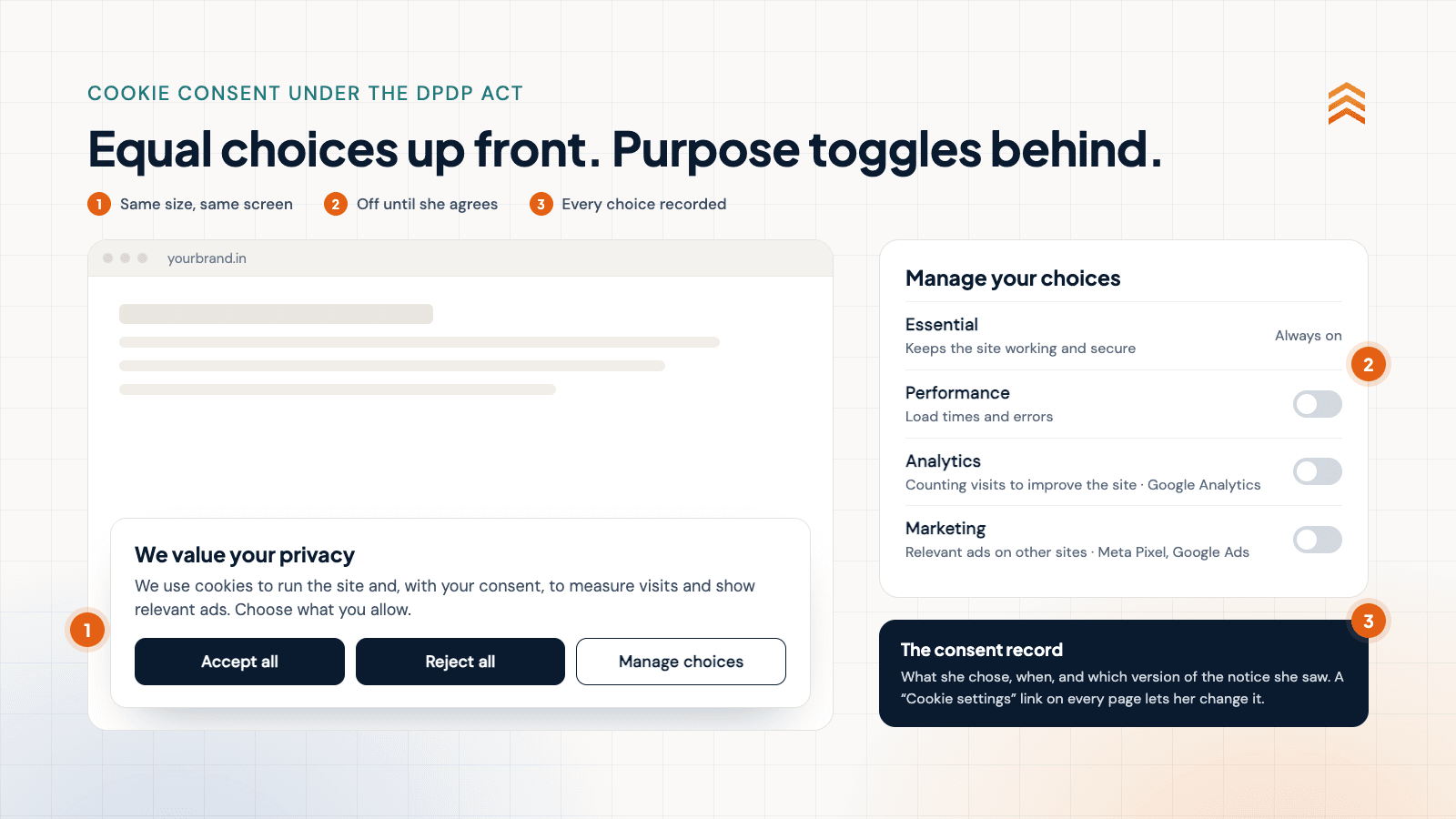
A cookie banner is the notice a visitor sees on her first page. It tells her which cookies and tags the site wants to use, and why. It lets her accept or refuse each purpose before anything optional runs.
A good banner has three layers:
- The first screen. A short, plain notice with "Accept all", "Reject all" and "Manage choices" side by side.
- The preference centre. A toggle for each purpose, a one-line description of each, and the vendors behind it.
- A permanent settings link. Usually in the footer, so she can change her mind on any page.
Behind all three sits a consent record. It logs what she chose, when, and which version of the notice she saw.
Section 6, Rule 3 and MeitY's Business Requirement Document for Consent Management Systems point to six features:
- Granular choices. Separate toggles for each purpose. The MeitY document names essential, performance, analytics and marketing categories.
- No pre-ticked boxes. Every optional category starts switched off.
- "Reject all" as easy as "Accept all". Same screen, same size, same visual weight.
- Trackers blocked until consent. No optional tag loads or sends data before she chooses.
- Withdrawal as easy as consent. Section 6(4) requires comparable ease. A footer link that reopens the preference centre meets it. An email to the DPO doesn't.
- Notice in English or an Eighth Schedule language. Sections 5(3) and 6(3) require the option. Under Rule 3, the notice should make sense on its own and itemise the data and purposes. [VERIFY: Rule 3 wording against G.S.R. 846(E)]
Not every cookie needs consent. The table sets out the three buckets.
| Bucket | Examples | What you need |
|---|---|---|
| Marketing and advertising | Meta Pixel, LinkedIn Insight Tag, Google Ads remarketing | Consent before the tag loads |
| Analytics | GA4, Clarity, other replay tools | Consent, unless truly anonymous and first-party |
| Strictly necessary | Login session, security, load balancing, the consent record itself | Notice only |
"Truly anonymous" sets a high bar. It means aggregate counts, no persistent ID, no full IP address and nothing shared with third parties. Strictly necessary cookies keep the site working at the visitor's request. The MeitY document allows only these to be on by default.
Point 3 already has teeth in India. In May 2026 the Central Consumer Protection Authority fined McAfee ₹1 lakh for a prompt with a bright red "Renew Now" and a grey alternative. It called this interface interference. In June it fined PhysicsWallah ₹5 lakh, partly for a pre-ticked donation box. Neither case involved cookies. Both show a regulator treating lopsided buttons and pre-ticked defaults as unfair today.
Keeping the banner right after launch
Most banners are accurate on launch day and wrong six months later. A new campaign adds a pixel. An agency publishes a tag through Tag Manager. A developer pastes a script from a vendor's setup guide. Nobody tells the banner.
If you are starting now, do these six things first:
- Audit every cookie, tag and SDK on the site, including ones agencies added.
- Put each one in a bucket, with its purpose, vendor and lifespan.
- Fix the banner so it has the six features above.
- Check that every vendor acting for you has a valid contract under Section 8(2).
- Stop attaching anonymous visit history to named records until consent exists.
- Write down the reason for each decision.
After that, treat the banner as a live control with a routine.
| Practice | How often | Why it matters |
|---|---|---|
| Keep a tag register with purpose, owner, vendor, lifespan and bucket | On every change | The notice must match what the site actually does |
| Send every new tag through DPO sign-off before it goes live | Every release | Stops tags slipping in through campaigns |
| Scan the live site with all consent refused | Monthly and after releases | Proves no optional cookie or ad request fires |
| Test the reject and withdraw paths end to end | Quarterly | Confirms tags actually stop |
| Pass each withdrawal on to vendors | Every withdrawal | Section 6(6) requires processors to stop as well |
| Ask again when purposes change, and expire old choices | When purposes change | The MeitY document expects renewed consent and expiry periods |
| Keep consent records with notice version and time | Always | Section 6(10) puts the burden of proof on you |
| Limit who can publish in Tag Manager | Quarterly review | Fewer hands, fewer surprise tags |
The consent record carries the most weight. Section 6(10) obliges the Data Fiduciary to prove that notice was given and consent obtained. A log you can produce on demand is that proof. A consent management system is one way to keep it.
Children: the bar most consumer brands forget
Section 9(3) says a Data Fiduciary "shall not undertake tracking or behavioural monitoring of children or targeted advertising directed at children". Under Section 2(f), a child is anyone under 18. Section 9(1) also requires verifiable parental consent before processing a child's data.
The penalty for breaching Section 9 can reach ₹200 crore. That is four times the cap for most consent failures.
This matters for edtech, gaming, toys, snacks, fashion and any site that draws teenagers. A retargeting pixel on an exam-preparation page tracks children. A banner click from a 15-year-old doesn't cure it, because the Act needs the parent's consent.
The Fourth Schedule to the Rules sets out narrow exemptions. One, added in the final Rules, covers tracking a child's real-time location for her safety. None of them licenses advertising pixels. Keep ad tags off youth-facing pages entirely.
The grey area and the dates that matter
The Act never uses the word "cookie". As far as we can find, neither do the Rules. [VERIFY: confirm the Rules text] The MeitY document discusses cookies, but it is a requirements document and doesn't bind anyone. The Data Protection Board's penalty powers start only in May 2027, so there is no ruling yet.
The position in this article is a reasoned reading. It rests on the breadth of "identifiable by or in relation to", the closed list in Section 7, and the vendors' own descriptions of their tags. A narrower view might hold for a short-lived first-party cookie. It is hard to argue for tags built to recognise people across websites.
Build for the broad reading now. Relaxing a strict setup later is easy. Rebuilding a consent stack in April 2027 isn't.
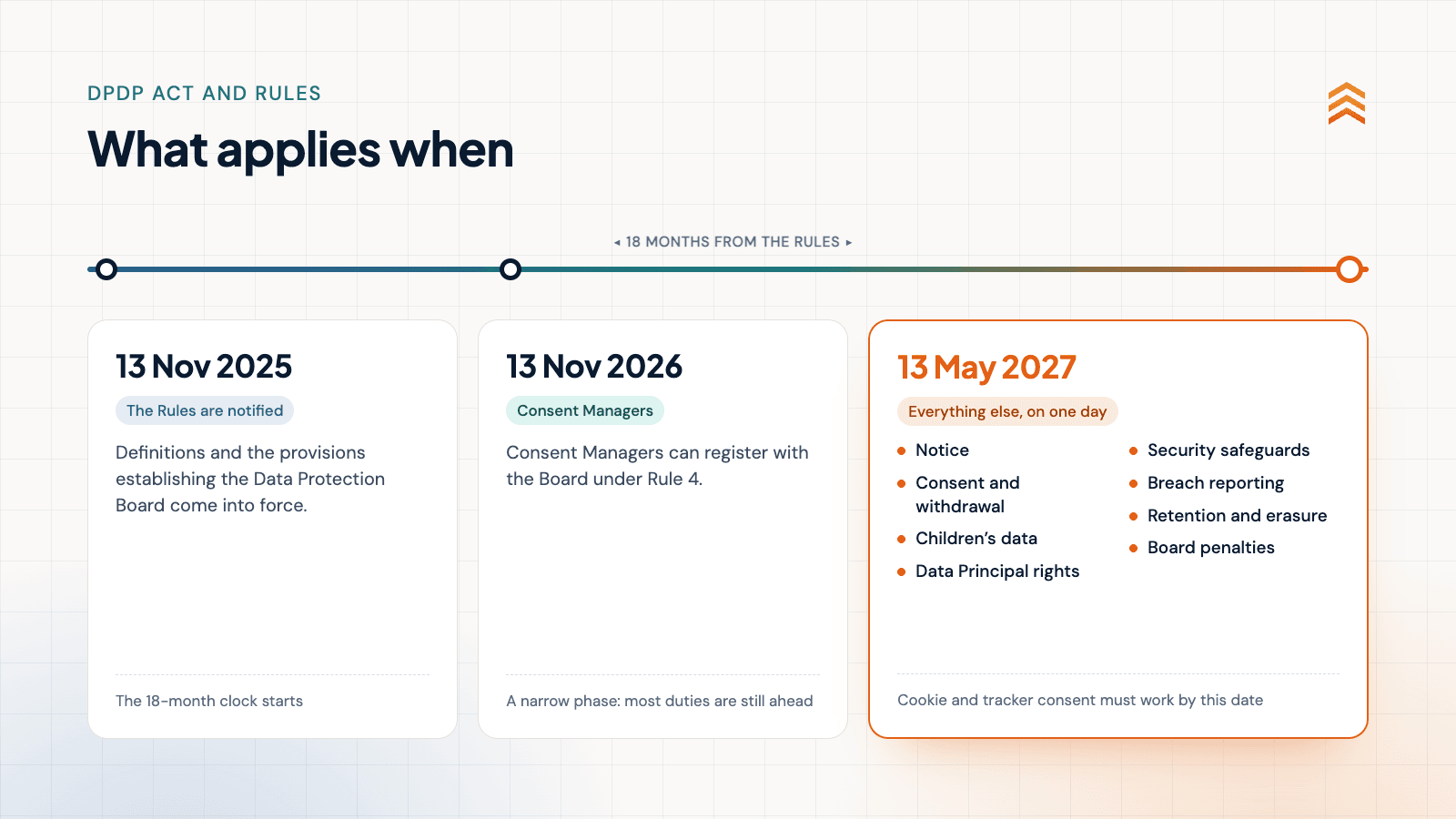
Consent Manager registration under Rule 4 opens on 13 November 2026. Notice, consent, children's rules and Board penalties apply from 13 May 2027. For a fuller plan, see working back from 13 May 2027.
Most consent failures fall under the residual entry in the Schedule, with penalties up to ₹50 crore. Failing to take reasonable security safeguards can cost up to ₹250 crore. Section 33(2) also lets the Board weigh how long a breach lasted and whether the company gained from it.
The form was never the starting line
Riya filled in nothing. Her device still holds IDs that will recognise her for months. Four companies hold a record of her visit, and the bank can join it to her name the day she applies.
The DPDP Act asks whether a person can be identified. On most websites, the answer is yes from the first tag that loads. That is where the banner has to stand, and where the consent has to come.
Sources
- Ministry of Law and Justice (via MeitY), "The Digital Personal Data Protection Act, 2023 (No. 22 of 2023)", 11 August 2023. Link
- SCC Online, "Your Complete Guide to Digital Personal Data Protection Rules, 2025", 14 November 2025. Link
- AZB & Partners, "India's Digital Personal Data Protection Act: Phased Rollout and Key Compliance Milestones", 14 November 2025. Link
- S.S. Rana & Co., "MeitY Notifies Final Digital Personal Data Protection Rules 2025", 14 November 2025. Link
- MediaNama, "MeitY Explains How an Ideal Consent Management System Should Work Under DPDPA", 11 June 2025. Link
- MediaNama, "Consumer protection authority fines PhysicsWallah and McAfee for dark patterns: what counts as consent now?", 4 June 2026. Link
- Google Analytics Help, "[GA4] Cookie usage on websites", accessed 19 October 2026. Link
- Google for Developers, "Consent mode overview", updated 30 July 2026. Link
- Meta for Developers, "ClickID and the fbp and fbc Parameters", accessed 19 October 2026. Link
- Meta for Developers, "Advanced matching: Meta Pixel", accessed 19 October 2026. Link
- Microsoft Learn, "Clarity cookie list", accessed 19 October 2026. Link
- Microsoft Learn, "Masking content: Microsoft Clarity", updated 15 November 2024. Link
- LinkedIn, "LinkedIn Insight Tag FAQ", accessed 19 October 2026. Link
- Intersoft Consulting, "Recital 30: Online Identifiers for Profiling and Identification (GDPR)", accessed 19 October 2026. Link